陈日志 发布的文章

Question 1

Task weight: 1%

You have access to multiple clusters from your main terminal through kubectl contexts. Write all context names into /opt/course/1/contexts, one per line.

From the kubeconfig extract the certificate of user restricted@infra-prod and write it decoded to /opt/course/1/cert.

题目解析:

  • 考点

    • kubectl
  • 解题

    ➜ kubectl config get-contexts -o name > /opt/course/1/contexts
    
    # 从 .kube/config 文件中找到
    - name: restricted@infra-prod
      user
        client-certificate-data: LS0tLS1CRUdJ...
    ➜ echo LS0tLS1CRUdJ... | base64 -d > /opt/course/1/cert

- 阅读剩余部分 -

Question 1

Task weight: 1%

You have access to multiple clusters from your main terminal through kubectl contexts. Write all those context names into /opt/course/1/contexts.

Next write a command to display the current context into /opt/course/1/context_default_kubectl.sh, the command should use kubectl.

Finally write a second command doing the same thing into /opt/course/1/context_default_no_kubectl.sh, but without the use of kubectl.

题目解析:

  • 考点

  • 解题

    • 根据题意:Write all those context names into /opt/course/1/contexts

      ➜ kubectl config get-contexts -o name > /opt/course/1/contexts
    • 根据题意:Next write a command to display the current context into /opt/course/1/context_default_kubectl.sh, the command should use kubectl

      ➜ vim /opt/course/1/context_default_kubectl.sh
      kubectl config current-context
    • 根据题意:Finally write a second command doing the same thing into /opt/course/1/context_default_no_kubectl.sh, but without the use of kubectl

      ➜ vim /opt/course/1/context_default_no_kubectl.sh
      grep "current-context: " ~/.kube/config | awk '{print $2}'

- 阅读剩余部分 -

# coding: utf8

# 使用说明:
# 1. 默认参数启动
#    python loggenerator.py
# 2. 自定义参数启动
#    KEY1=VALUE1 KEY2=VALUE2 python loggenerator.py
#    支持参数:
#       TYPE: 日志类型,默认json,可选txt
#       MAX: 日志总量,默认10000000
#       SPEED: 每秒生成日志量,默认15000
#       OUTPUT: 日志文件,默认logs/sum.log
#       MAXSIZE: 日志文件大小,超过此大小将会进行轮转
import os
import gzip
import shutil
from random import random
import time
import json


def logCompressor(filepath):
    offset = 0
    maxsize = os.getenv('MAXSIZE', 50 * 1024 * 1024)
    r = ''
    while True:
        n = yield r
        if not n:
            return
        size = os.path.getsize(filepath)
        if size >= maxsize:
            tmpfile = "%s%d_tmp" % (filepath, int(random() * 1e17))
            shutil.move(filepath, tmpfile)
            gzip.GzipFile(filename="", mode='wb', compresslevel=9, fileobj=open(
                "%s-%s.%d.log.gz" % (filepath.split('.')[0], time.strftime("%Y.%m.%d", time.localtime()), offset),
                'wb')).write(open(tmpfile, 'rb').read())
            os.remove(tmpfile)
            offset += 1
            r = '200'
        else:
            r = '0'


def logGenerator(c, maxline, speed, filepath, logtype):
    if not os.path.exists(os.path.dirname(filepath)):
        os.mkdir(os.path.dirname(filepath))
    fb = open(filepath, 'a+')
    c.send(None)
    n = 0
    while n < maxline:
        start = time.time()
        s = 0 # 控制速率
        while s < speed:
            if logtype == 'json':
                m = {
                    "level": "INFO",
                    "date": time.strftime("%Y.%m.%d %H:%M:%S", time.localtime()),
                    "message": "time:%s, nothing to do!" % time.time(),
                    "business": "logGenerator:19",
                    "service": "loggenerator",
                    "hostname": "fluentd1"
                }
                m = json.dumps(m)
            else:
                m = '%s [INFO] [logGenerator:19] - time:%s, nothing to do!' % (time.strftime("%Y.%m.%d %H:%M:%S", time.localtime()), time.time())
            fb.write(m + "\n")
            n += 1
            s += 1
            r = c.send(n)
            if r == '200':
                fb.close()
                fb = open(filepath, 'w+')
        end = time.time()
        if end - start < 1:
            # 写入耗时小于1秒,控制写入速度
            time.sleep(1 - (end - start))
    c.close()


if __name__ == "__main__":
    maxline = os.getenv('MAX', 10000000)
    speed = os.getenv('SPEED', 15000)
    logfile = os.getenv('OUTPUT', 'logs/sum.log')
    logtype = os.getenv('TYPE', 'json')
    c = logCompressor(logfile)
    logGenerator(c, maxline, speed, logfile, logtype)
nf_conntrack 调优

netfilter

netfilter是linux内在的一个软件框架,用来管理网络数据包。

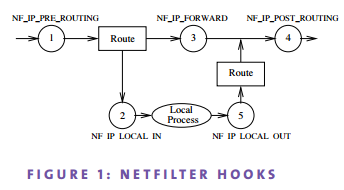
netfilter提供了5个hook来进行管理网络包。如下图:

netfilter-hooks

  • PREROUTING, 所有包都会经过这个hook
  • LOCAL INPUT, 进入本机的包会经过这个hook
  • FORWARD, 不进入本机的包,做转发的包会经过这个hook
  • LOCAL OUTPUT, 从本机出去的包会经过这个hook
  • POSTROUTING, 所有出去的包都会经过这个hook

netfilter进行包的管理,则需要记录每个连接的状态信息。这就是nf_conntrack的工作了。

nf_conntrack

nf_conntrack是netfilter的一个子系统。它记录了每个连接的状态信息。

nf_conntrack记录的信息包括,源ip、端口,目标ip、端口,连接状态,协议等。

连接状态包含以下几种:

  • NEW, 新创建的连接,发起连接方发出包后,还没收到回包,都处理这种状态。
  • ESTABLISHED, 已建立的连接,发起连接后,收到回包,这时处理已连接状态。
  • RELATED, 与其他连接相关联,其他的连接与此连接有关联。如ftp的控制连接和数据连接。
  • INVALID, 非法的连接,比如包的行为不合法。

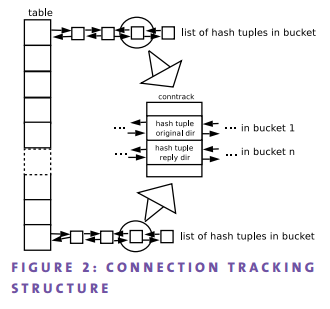
nf_conntrack需要保存这些信息在它自己的数据结构中。其数据结构如下:

connection-tracking-structure

它是一个开链的哈希表,链表是一个双向表。每个哈希节点称为一个bucket,计算出同样哈希值的连接放到链表里连起来。 每个节点记录了请求方向、响应方向的消息。

哈希表的大小,也就是说哈希表的节点数,由nf_conntrack_buckets配置。

nf_conntrack能跟踪的最大连接数由nf_conntrack_max配置。

- 阅读剩余部分 -

在使用 Kubernetes 中,经常会遇到一个奇怪的现象,当 Pod 与 CoreDNS 在同一个 Node 节点时,此 Pod 无法解析 DNS 记录。

我清楚的知道 Service 是使用 iptables NAT DNAT + SNAT 规则实现的,因此我排查的方向是抓包查看数据包的流向。

经过抓包分析,发现同一个 Node 节点访问 Service 只是对访问的流量进行了 DNAT,没有做 SNAT。但当时并没有找到解决方法,今天又遇到了一样的问题,通过爬文找到了这篇文章,所描述的问题现象一模一样,也附带了解决方法,并有详细的排查过程,读者可以去拜读一下。

我的 Kubernetes 集群是使用 kubeadm 部署的,因此解决方法是修改 kube-proxy 的 ConfigMap

[root@k8s-master01 ~]# kubectl -n kube-system get cm
NAME                                 DATA   AGE
coredns                              1      20d
extension-apiserver-authentication   6      20d
kube-flannel-cfg                     2      20d
kube-proxy                           2      20d
kubeadm-config                       2      20d
kubelet-config-1.18                  1      20d
metrics-server-config                1      19d
kubectl -n kube-system edit cm kube-proxy

# 修改 masqueradeAll: true

重启所有节点的 kube-proxy:

[root@k8s-master01 monitoring]# kubectl -n kube-system get pods
NAME                                      READY   STATUS    RESTARTS   AGE
coredns-66bff467f8-5v2j7                  1/1     Running   1          20d
coredns-66bff467f8-gtrdb                  1/1     Running   0          26m
etcd-k8s-master01                         1/1     Running   1          20d
kube-apiserver-k8s-master01               1/1     Running   1          20d
kube-controller-manager-k8s-master01      1/1     Running   2          20d
kube-flannel-ds-94n7x                     1/1     Running   1          20d
kube-flannel-ds-nf26k                     1/1     Running   1          20d
kube-flannel-ds-nl2dl                     1/1     Running   1          20d
kube-flannel-ds-thl9f                     1/1     Running   2          20d
kube-proxy-gpxhb                          1/1     Running   1          20d
kube-proxy-k2gjh                          1/1     Running   1          20d
kube-proxy-lp5jw                          1/1     Running   1          20d
kube-proxy-z67qm                          1/1     Running   1          20d
kube-scheduler-k8s-master01               1/1     Running   3          20d
metrics-server-v0.3.6-5d9877d6b6-bqq8d    2/2     Running   2          19d
nfs-client-provisioner-5fbf5f4476-fpmdq   1/1     Running   2          10d
# 删掉Pod,让其重建
kubectl -n kube-system delete pod kube-proxy-gpxhb kube-proxy-k2gjh kube-proxy-lp5jw kube-proxy-z67qm

至此,问题解决。